
Know what's safe to spend before your next payday.
Your bank balance does not tell you what is actually available to spend. Some of that money may already be needed for bills, groceries, fuel, upcoming expenses and savings contributions. Payday Buffer helps you account for the things you choose to include, so you can see what this payday needs to cover and what may be left.
Get Payday Buffer for $19.95One-off purchase. No subscription.
Not sure yet? Try the free Payday Check first.
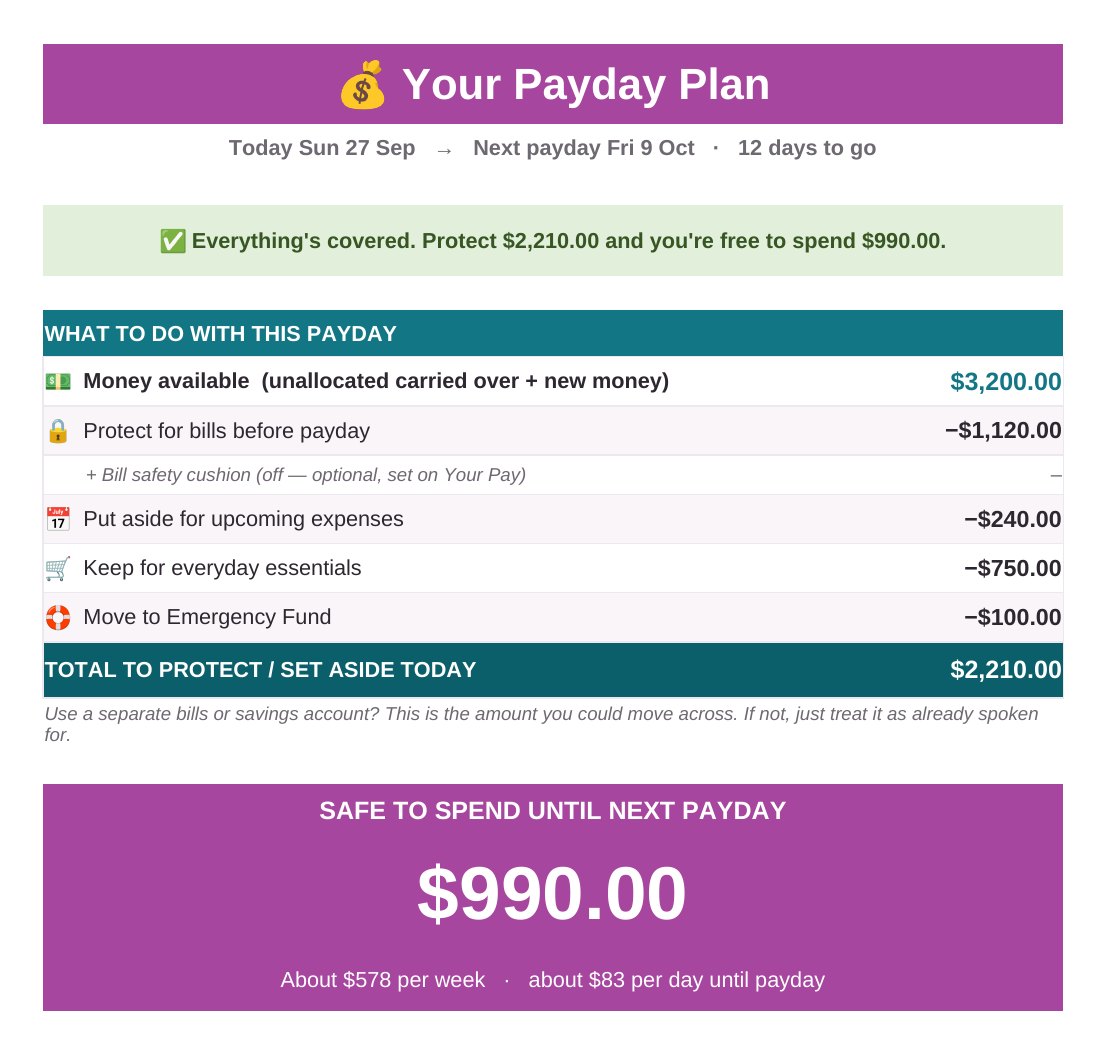
The real Payday Plan tab, filled in with example figures.

I did not need another budget. I needed an answer on payday.
I used to look at my account balance after payday and still not know what was actually available to spend.
There might be money there, but I knew some of it was already needed for bills, groceries, fuel, direct debits, and expenses that were coming up later.
So I would do the maths in my head again and again.
I did not need a complicated system that showed me every category from last month. I needed to know what this payday had to cover.
That is why I created Payday Buffer.
Alex, founder of Money Detective
Your bank balance is not always your spending money.
You have been paid. The balance looks okay. But some of that money may already be needed before your next payday.
Bills land between paydays
Rent, direct debits and repayments come out on different days. It is easy to count money that is already spoken for.
Payday maths in your head
Groceries, fuel, the bill due next week, rego coming up. Keeping the whole list in your head is tiring.
Big costs arrive in one hit
Rego, insurance and Christmas are predictable. They just feel like surprises when nothing has been put aside.
See what this payday needs to cover.
Safe to Spend is the amount remaining after the bills, essential spending, planned set-asides and optional savings contributions you choose to include have been accounted for.
Your Safe-to-Spend figure is a planning estimate based on the information you enter. It does not monitor your bank account or automatically know about expenses you haven't entered, and it isn't financial advice. For the most useful result, keep your upcoming bills and expenses up to date.
| Your payday plan | Example amount |
|---|---|
| Money available | $3,200 |
| Bills before next payday | −$1,120 |
| Upcoming expenses | −$240 |
| Essential living money | −$750 |
| Emergency Fund contribution | −$100 |
| Safe to Spend | $990 |
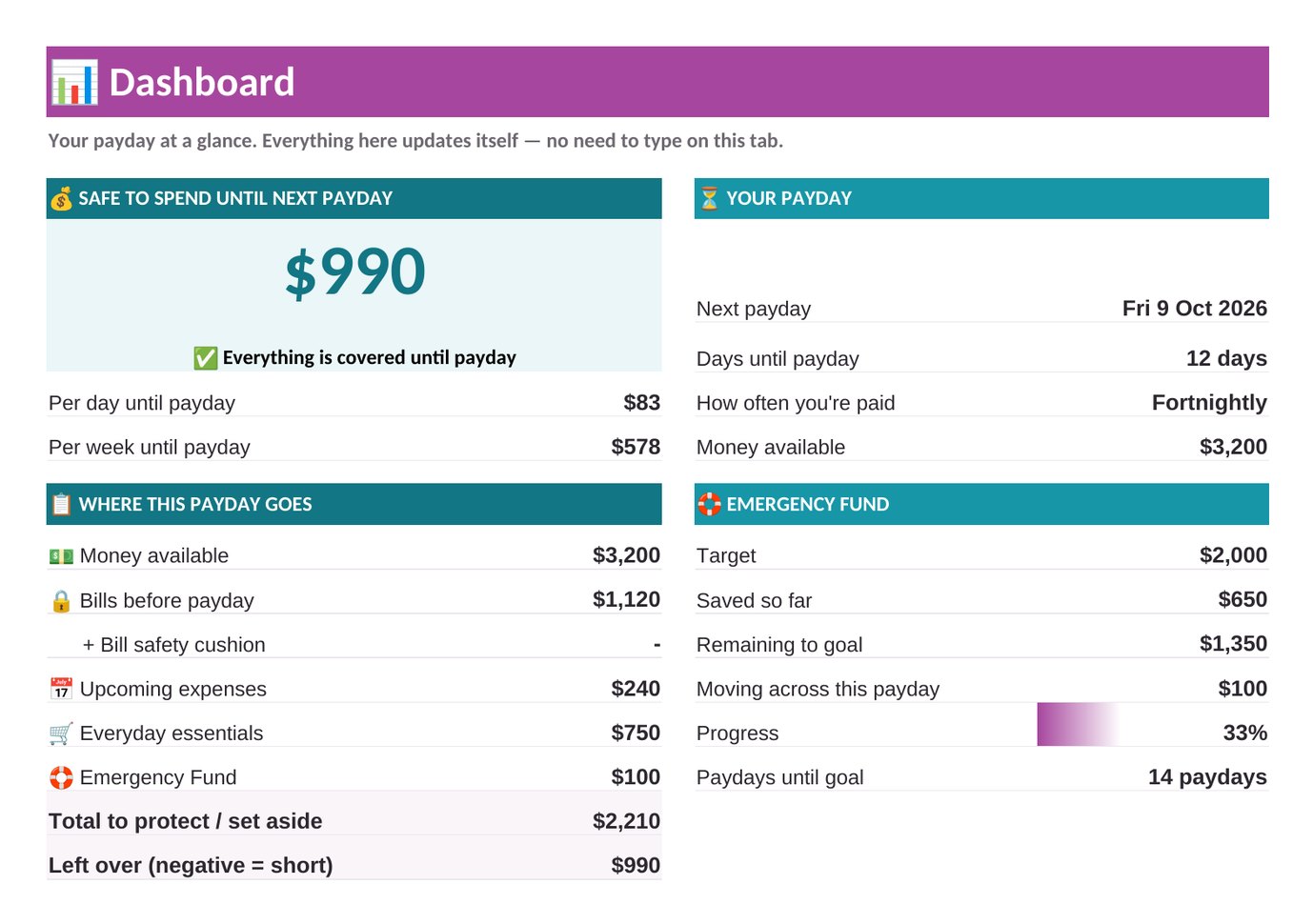
The same example on the Dashboard tab. Your own numbers will be different.
A clearer plan in a few steps.
Work through the tabs from left to right. Only type in the yellow cells.
- Add the income available for this pay cycle and pick your next payday.
- List the bills and direct debits due before your next payday.
- Allow for essential living money, such as groceries and fuel.
- Set aside money for upcoming or irregular expenses, and choose whether to add a bill safety cushion or Emergency Fund contribution.
- Review your Payday Plan and Safe-to-Spend estimate.
You are done when you can see your Payday Plan and Safe-to-Spend figure for the next pay cycle.
Rego is not unexpected. It is just easy to forget until it is due.
Add each bigger cost once, with how often it comes up, what it costs, when it is next due and anything you have already saved. Payday Buffer works out what to put aside from this pay so the money has a better chance of being there when it is due.
- Rego
- Insurance
- School costs
- Car servicing
- Vet bills
- Christmas
- Annual subscriptions
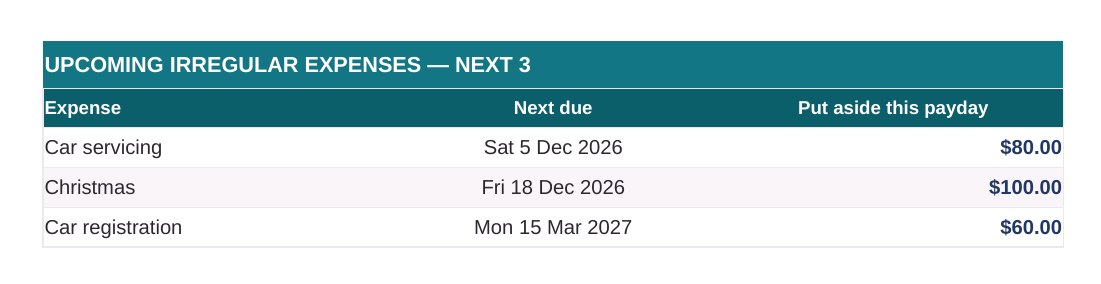
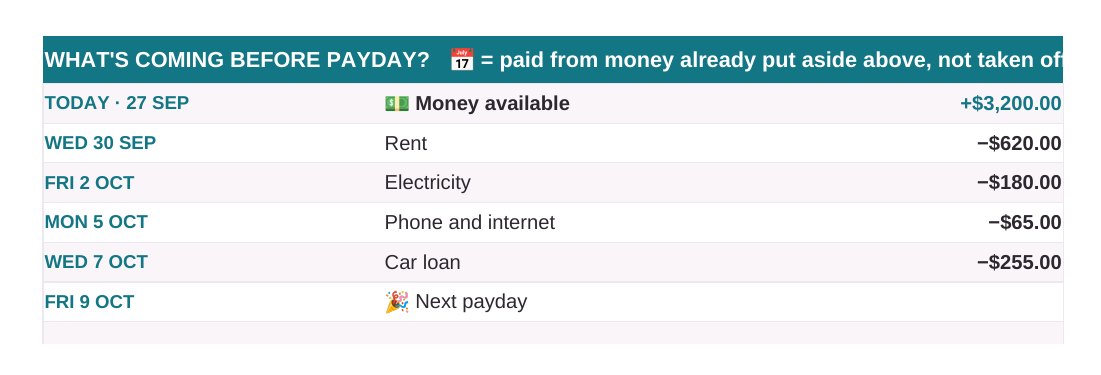
Upcoming costs and a date-ordered view of what is coming before payday.
Built for real life between paydays.
A good fit if payday feels like a maths test.
Payday Buffer suits you if you:
- Are paid weekly, fortnightly or monthly and want a plan for this pay
- Keep checking your balance and doing the maths in your head
- Want to plan for rego, insurance and Christmas before they land
- Plan money with a partner or have more than one income
- Prefer not to connect your bank account to an app
- Are comfortable typing a few numbers into a spreadsheet
It is probably not for you if you want:
- An app that syncs with your bank automatically
- A full history of where every dollar went last month (that is what Fortnightly Budget Plus is for)
- Personalised financial advice or financial counselling
- Investment, loan or super recommendations
One simple price. No subscription.
Payday Buffer by Money Detective
- Payday Buffer digital workbook (.xlsx for Excel, Google Sheets and Apple Numbers)
- Read Me and setup instructions inside the workbook
- Personal-use licence for you and your household
- Basic product and setup support from Money Detective
- Download link shown straight after payment is confirmed, with a copy emailed to you
One-off purchase. No subscription.
Works in the spreadsheet app you already use.
Payday Buffer has been tested on each of these platforms, including the optional missed-bills check.
| Platform | Core workbook | Missed-bills check |
|---|---|---|
| Excel for Windows | Supported | Supported |
| Excel for Mac | Supported | Supported |
| Excel Online (web) | Supported | Supported |
| Google Sheets | Supported | Supported |
| Apple Numbers | Supported | Supported |
- No Microsoft 365 subscription needed. The free Excel Online, Google Sheets and Apple Numbers all work.
- No macros, VBA, add-ins, Power Query or data connections. Nothing to enable and nothing connects to the internet.
- A desktop or laptop is recommended for setup.
Questions about your setup? Email hello@moneydetective.com.au.
Questions before you buy
What is Payday Buffer?
Payday Buffer is a one-off digital spreadsheet workbook for planning your next payday. You enter the money available, the bills due before your next payday, essential living money, upcoming expenses and any savings you want to include. It then shows a Payday Plan and a Safe-to-Spend planning estimate.
What does Safe to Spend mean?
Safe to Spend is the amount remaining after the bills, essential spending, planned set-asides and optional savings contributions you choose to include have been accounted for.
Your Safe-to-Spend figure is a planning estimate based on the information you enter. It does not monitor your bank account or automatically know about expenses you haven't entered, and it isn't financial advice. For the most useful result, keep your upcoming bills and expenses up to date.
What do I need to use Payday Buffer?
A computer with Microsoft Excel (Windows, Mac or the free Excel Online), Google Sheets or Apple Numbers. A desktop or laptop is recommended for setup.
Does Payday Buffer work with Microsoft Excel?
Yes. Payday Buffer is a standard Excel .xlsx workbook and has been tested in Excel for Windows, Excel for Mac and Excel Online.
Does it work on Windows and Mac?
Yes. It has been tested in Excel for Windows and Excel for Mac. On a Mac you can also use Apple Numbers or Google Sheets.
Does it work with Excel Online?
Yes. It has been tested in Excel Online, the free web version of Excel.
Does it work with Google Sheets?
Yes. Upload the file to Google Drive and open it with Google Sheets. It has been tested there, including the optional missed-bills check.
Does it work with Apple Numbers?
Yes. Open the .xlsx file in Numbers on your Mac, iPad or iPhone. It has been tested there. Setup is easiest on a Mac.
Do I need Microsoft 365?
No. You can use the free Excel Online, Google Sheets or Apple Numbers. If you already have desktop Excel, that works too.
Does Payday Buffer use macros or require add-ins?
No. There are no macros, VBA, add-ins, Power Query or external data connections. You will not be asked to enable content to use it.
Do I need to connect my bank account?
No. Payday Buffer never connects to your bank. You type your own figures.
How does transaction import work?
It is an optional tab called Import Transactions for finding bills you may have missed. You copy rows from a bank statement (Date, Description and Amount) and paste them in. The free Bank Statement Converter can turn a PDF statement into rows you can copy. The tab lists repeating charges you have not added yet. It never changes your Safe to Spend, and it can miss charges whose descriptions change each time.
Do I have to import transactions?
No. It is completely optional. The Payday Plan works without it.
Can I use it if I am paid weekly?
Yes. Choose Weekly and pick your next payday. The plan runs from today until that payday.
Can I use it if I am paid fortnightly?
Yes. Choose Fortnightly and pick your next payday.
Can I use it if I am paid monthly?
Yes. Choose Monthly and pick your next payday. You can also enter the usual day of the month you are paid.
Can I include my partner's income?
Yes. There is a separate line for a partner's pay.
Can I include Centrelink, child support or other income?
Yes. There are separate lines for Centrelink or family payments, child support and other income, plus any unallocated money you are carrying over.
How are irregular expenses handled?
On the Upcoming Expenses tab you add each cost, how often it comes up (monthly, quarterly, six-monthly, annual or one-off), the expected cost, when it is next due and anything already saved. Payday Buffer spreads the amount still needed across the paydays left and shows what to put aside this payday. Repeating costs roll forward once their due date passes.
What happens if I do not have enough money to cover everything?
The Payday Plan shows how short the plan is and which area is putting the most pressure on it, so you can check the amounts and decide what needs attention first. It does not make that decision for you. If you are experiencing financial hardship, free financial counselling may be able to help. The National Debt Helpline is on 1800 007 007 (ndh.org.au).
Can I plan an Emergency Fund contribution?
Yes, if you want to. Set a target, enter what you have saved and choose how much to save each pay. It shows your progress and roughly how many paydays until you reach the goal. It is optional.
How do I receive the product?
You pay through Stripe's secure checkout. Once payment is confirmed, you are taken to a page with your download link, and a copy of the link is emailed to the address used at checkout.
Can I make a backup?
Yes. You may make copies or backups for your own household use.
Can I share it?
You can use it with the people in your household. You may not share the workbook with other households, redistribute it, resell it, upload it publicly, or reproduce it commercially.
Is Payday Buffer financial advice?
No. Payday Buffer is a planning tool. It organises the information you choose to enter. It does not provide personalised financial advice, financial counselling or product recommendations.
What if I need help setting it up?
Email hello@moneydetective.com.au. Money Detective can provide basic support for product access, setup and using the workbook. Support does not include personalised budgeting advice, financial advice or financial counselling.
What is the refund policy?
Because Payday Buffer is a digital download supplied straight after payment, we do not generally offer refunds for change of mind. If the file cannot be downloaded, is faulty or does not match its description, contact us and we will help, which may include a replacement or a refund. This does not limit your rights under the Australian Consumer Law. Read the full Refund Policy.
Plan your next payday with the maths already laid out.
Account for what this pay needs to cover, then see what may be left. No subscription. No bank connection.
Get Payday Buffer for $19.95One-off purchase. No subscription.
Want all six Money Detective spreadsheets? See the Complete Toolkit.