
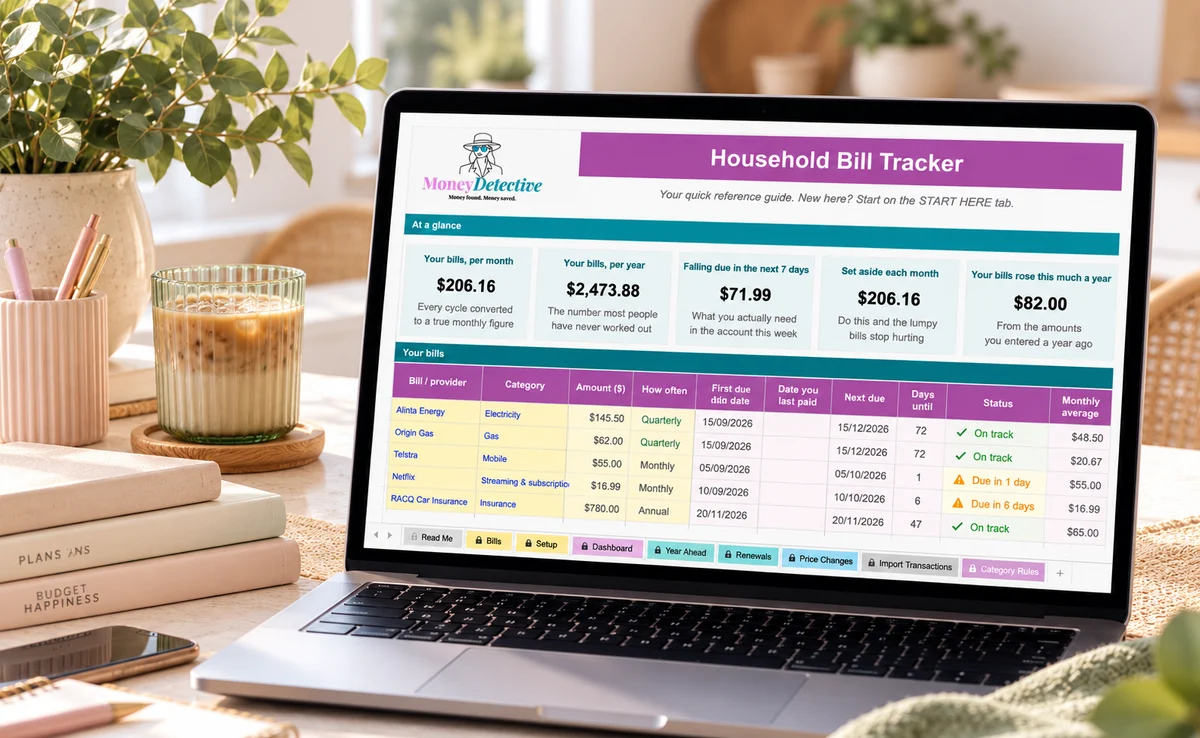
The Household Bill Tracker is an Excel spreadsheet that lists your bills in one place, flags renewals before they catch you out, and shows the true monthly cost of each bill, whatever its billing cycle.
Some monthly, some quarterly, some annual, hard to compare what anything actually costs you each month.
Insurance and contract renewals lapse or auto-renew at a higher rate without warning.
Bills scattered across emails, apps, and memory, nothing pulls it all together.
Provider, amount, and how often it bills, however irregular.
Due date and renewal/contract-end date for each one.
Choose how many days warning you want (45 by default) and any contract ending soon is flagged on the Dashboard and Renewals tab, before it's too late.
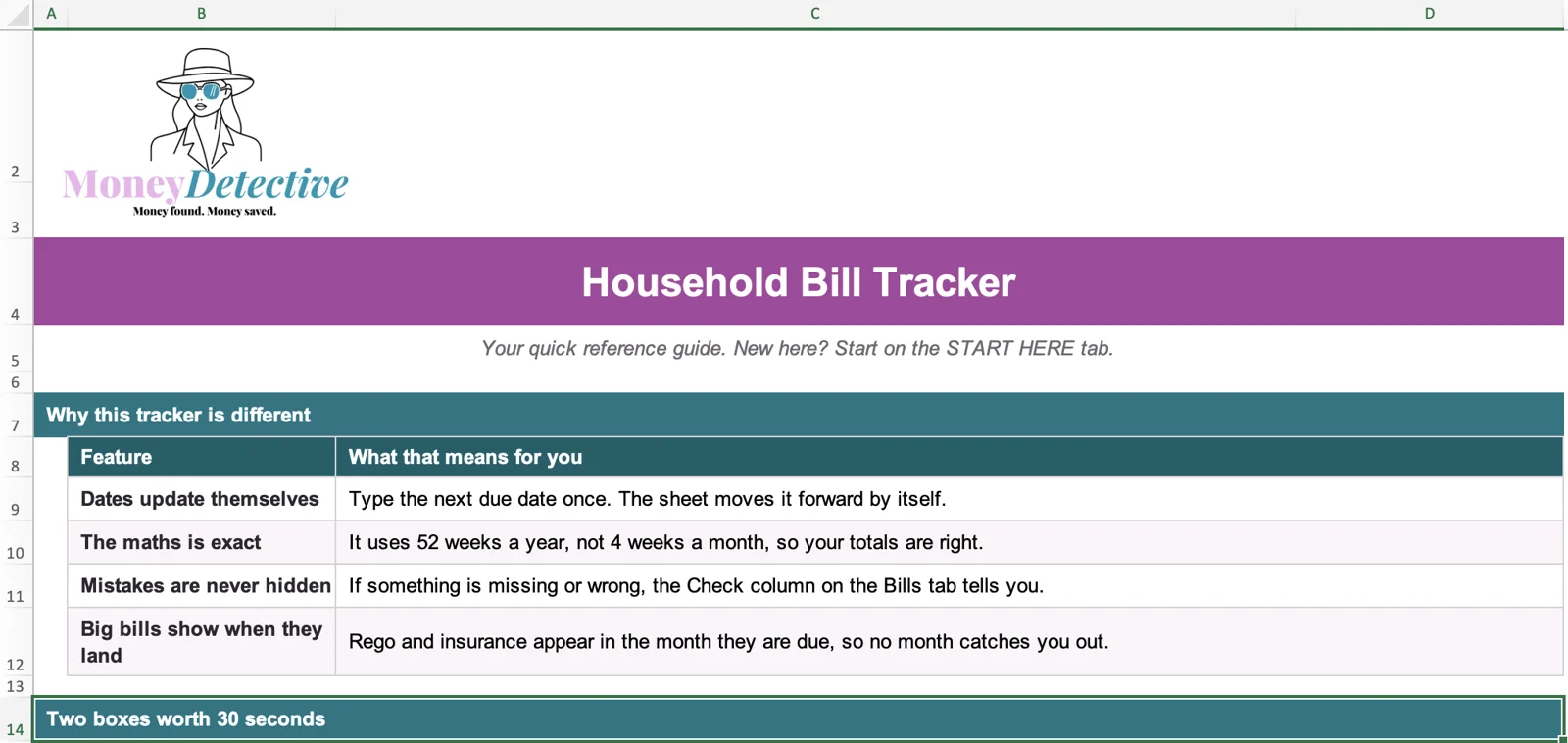
Dates roll forward by themselves, totals use 52 weeks a year, and a Check column tells you if anything is missing or wrong.
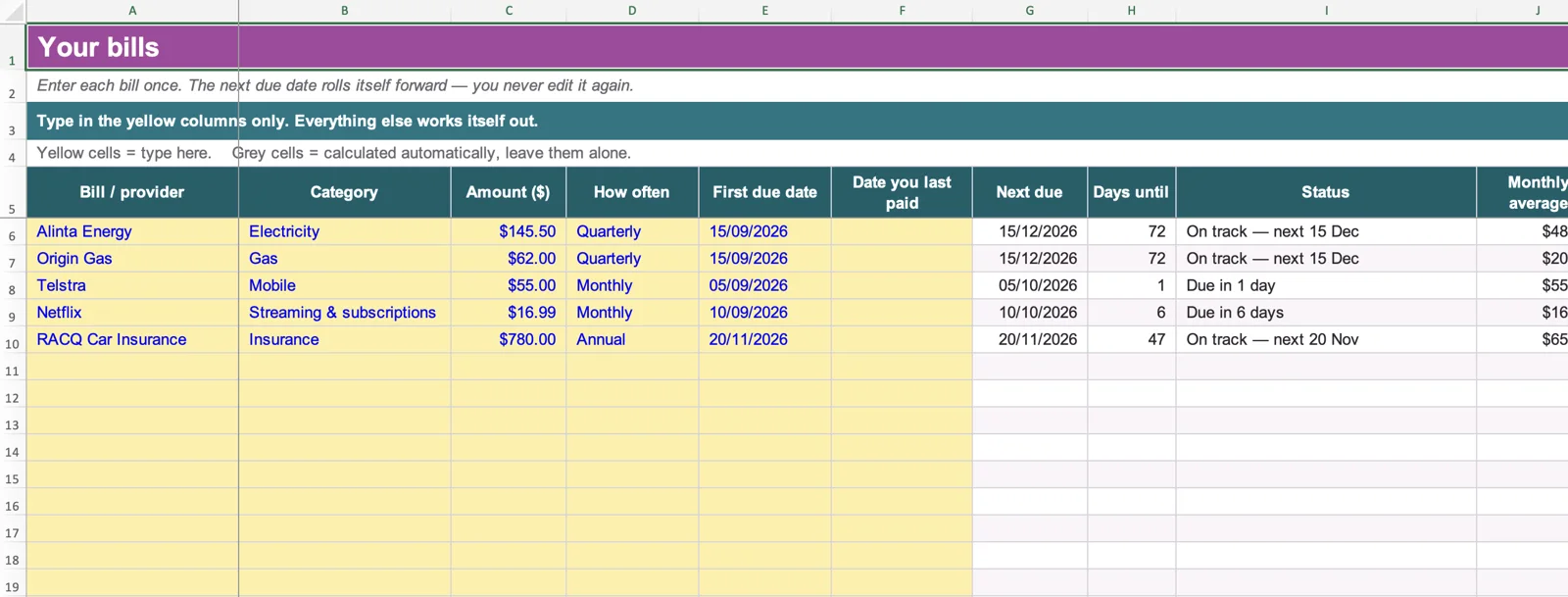
Add a bill once. The next due date, days until it is due and the true monthly cost are worked out automatically, whatever the billing cycle.
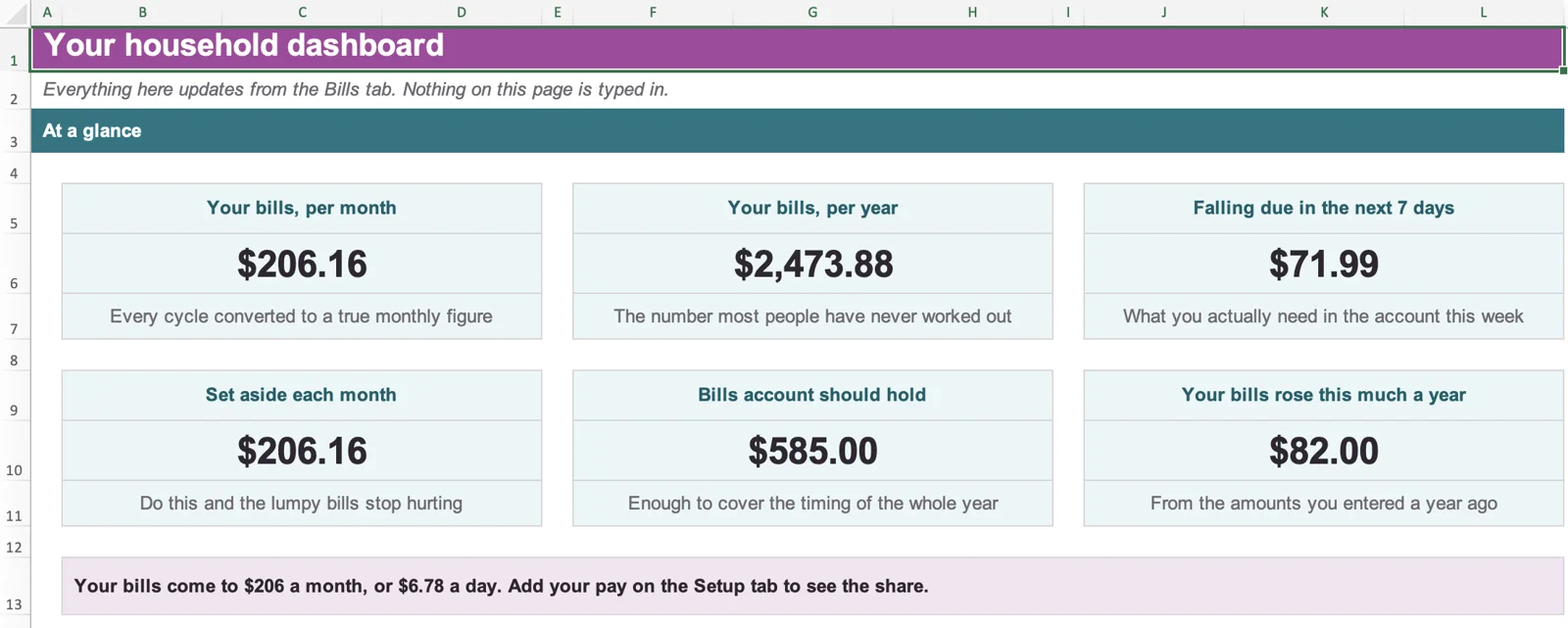
Your bills per month and per year, what falls due this week, how much to set aside each month and how much your bills have risen.
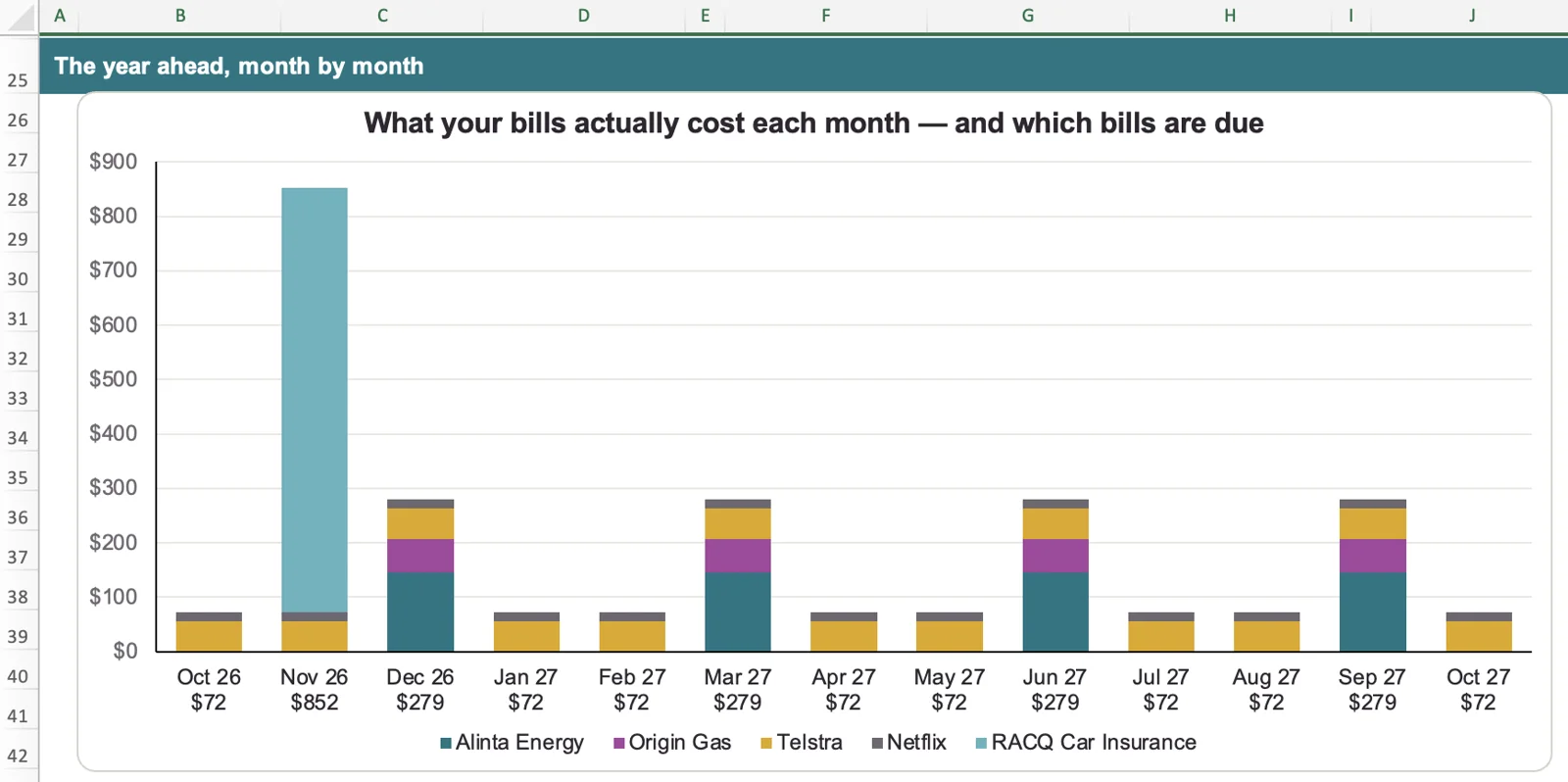
See what your bills cost each month for the next year and which ones are due, so rego and insurance never catch you out.
A bill tracker is only useful if you can compare like with like. A $390 electricity bill every quarter and a $20 weekly bill look nothing alike on paper, but both have a monthly cost. This bill tracker template converts every recurring bill to a monthly equivalent with one formula.
Why not just multiply a weekly bill by four? Because a year has 52 weeks, not 48. Treating every month as four weeks leaves out four weeks of bills a year, so that $20 weekly bill would look like $80 a month when it really works out to about $86.67. Using payments per year ÷ 12 keeps weekly and fortnightly bills honest.
Each bill is entered once, along with how often it is billed. The bill tracker spreadsheet supports eight billing frequencies:
Because every recurring bill is converted to a monthly figure, a weekly gym membership, a quarterly power bill and an annual insurance premium can sit side by side, and you can see what they add up to each month and over the year.
If you also want a plan for paying off debts, the Debt Payoff Planner is a separate Excel workbook that compares the snowball and avalanche methods and estimates a debt-free date.
You can use it as a utilities tracker for electricity, gas, water, internet and mobile, with each bill given a category so you can see what your utilities cost each month. It is a general household bill tracker with utility categories, not a separate utilities-only product, so insurance, subscriptions, rent or mortgage, council rates and other regular bills sit in the same list.
If an electricity bill is hard to follow, our guide to how to read an electricity bill in Australia explains the figures that matter, and Energy Plan Check can help you look at current plan rates.
Where you list each bill once: provider, category, amount, how often it is billed and the first due date. The next due date, days until it is due and the monthly cost are worked out for you.
A few optional answers, such as your bills account balance, your monthly take-home pay and how many days warning you want before a contract ends. The tracker works without them.
Your bills per month and per year, what falls due in the next 7 days, how much to set aside each month and how much your bills have risen, with charts of your monthly bills and your biggest bills.
A 12-month view of the bills due each month, the amount to set aside, your bills account balance at month end and the biggest bill that month.
Contracts listed by end date, most urgent first, with the days remaining and a prompt for what to do next.
Compares what a bill cost a year ago with what it costs now, so you can see which bills have crept up. Add an "Amount a year ago" on the Bills tab for any bill you want tracked.
Paste in statement transactions to check what you actually paid. Everything else in the workbook works without it.
The workbook also includes a Start Here tab, a Read Me and sample data you can overwrite with your own bills.
Add a contract end date to a bill and the tracker flags it when it falls inside your warning period. The default is 45 days before the recorded end date, and you can change that number on the Setup tab. Flagged contracts appear as alerts on the Dashboard and are listed on the Renewals tab, most urgent first.
The warnings show up when you open the workbook. The spreadsheet does not send emails, push notifications or reminders outside Excel, so it works best if you check the Dashboard regularly.
Bills are not spread evenly across the year. The Year Ahead tab builds a 12-month forecast from your billing cycles and due dates, showing which bills fall due each month, the biggest bill that month and how much to set aside monthly to smooth out the lumps.
If you also enter your current bills account balance on the Setup tab, the forecast shows how that balance could move month by month and the lowest point it would reach. Entering your monthly take-home pay lets the Dashboard show what share of your pay goes to bills. These are estimates based on the figures you enter, not a guaranteed outcome.
Large annual bills are usually the ones that hurt most, so our guides to budgeting for annual bills and sinking funds in Australia pair well with this tab. If you budget around pay days, the Payday Buffer and Fortnightly Budget Plus spreadsheets cover that side. To see where the rest of your money goes, see how to set up an expense tracker spreadsheet. If you own your home, council rates are another bill worth tracking.
If you want to check what you actually paid, you can paste your statement transactions into the Import Transactions tab by hand. Paste four columns only: Date, Description, Account and Amount. The workbook holds up to 600 transactions and 30 bills.
Categories fill in automatically from each description, so review them and correct any that are wrong using the correction column. No bank connection. No app required. If your statement is a PDF, our free bank statement converter can turn it into spreadsheet-ready rows you can copy from.
This tracker was built after one too many surprise renewal notices. It's the tool I wished existed, one place to see every bill, due date, and true monthly cost, without digging through emails or apps.
Keeping track of your bills should not mean taking on another monthly bill. Apps are the better choice if you want your bank to sync automatically. If you would rather pay once, keep your data in your own file and skip the bank link, a spreadsheet can work out a lot cheaper over time.
| What matters | Household Bill Tracker | A subscription budgeting app, such as YNAB |
|---|---|---|
| What it costs | $9.95 once | US$14.99 a month, or US$109 a year on the annual plan |
| Over three years | $9.95. You only pay once. | US$327 or more |
| Your bank and your data | Nothing connects to your bank, so there is no bank login to share. Your data stays in your own Excel file. | Apps that sync link your accounts and keep your data online. Frollo is free and uses Open Banking. YNAB has no direct import for Australian banks. |
| Entering your figures | You type them in, or paste rows from your statement. Our free Bank Statement Converter turns a statement PDF into rows ready to paste. | Many apps bring transactions in for you automatically. |
| If you stop paying | There is nothing to stop. You keep the file. | Access ends when the subscription does. |
YNAB prices are from YNAB's own pricing page, in US dollars plus tax where applicable, checked on 13 November 2026, and may change. All other amounts are Australian dollars. Frollo details are from its app listing. The Household Bill Tracker is a spreadsheet, not a bank-syncing app.
Yes. It is a Microsoft Excel (.xlsx) file.
No. There is no bank connection and you never provide bank login details. If you want to check what you actually paid, you can paste statement transactions into the optional Import Transactions tab, or use our free bank statement converter to turn a PDF statement into spreadsheet-ready rows first.
Anything that repeats, electricity, gas, insurance, subscriptions, phone plans. If it bills you regularly, it belongs in here. For prompts, see our household bills checklist. When a phone plan comes up for renewal, a quick mobile plan comparison shows whether it still suits you.
Designed for Microsoft Excel (.xlsx). We recommend using Excel on a desktop or laptop for the easiest setup and editing experience.
The workbook has room for up to 30 bills and up to 600 imported transactions.
Eight: weekly, fortnightly, monthly, every two months, quarterly, half-yearly, annually and one-off. Recurring bills are converted to a monthly figure using bill amount × payments per year ÷ 12. One-off bills are shown with their due date but are not averaged into the monthly cost.
Yes. The category list includes electricity, gas, water, internet and mobile. It is a general household bill tracker with utility categories, not a utilities-only product, so insurance, subscriptions and other regular bills can sit in the same list.
Yes, for recurring bills. Enter the first due date and how often the bill comes, and the next due date rolls forward by itself as time passes. You can also enter the date you last paid. A one-off bill stays on its single due date.
No. This is an educational budgeting and organisation tool. It doesn't recommend any specific provider or financial product.
You get immediate access to the downloadable file and a short setup guide.
See every bill, every due date, and the true monthly cost, all in one place.
Get the Bill Tracker for $9.95 →