
Enter up to eight debts with their balances, interest rates and repayments. This Excel spreadsheet works out your estimated debt-free date and total interest, month by month, then lets you compare snowball and avalanche.
See roughly how long minimums alone take, and what the interest adds up to.
Change the amount and see the estimated effect on your debt-free date.
Both get recommended. Enter your own debts and compare them side by side.
Name, balance, interest rate and minimum payment for each one. Up to eight debts.
Avalanche (highest rate first) or snowball (smallest balance first), plus any extra you can put on top of the minimums.
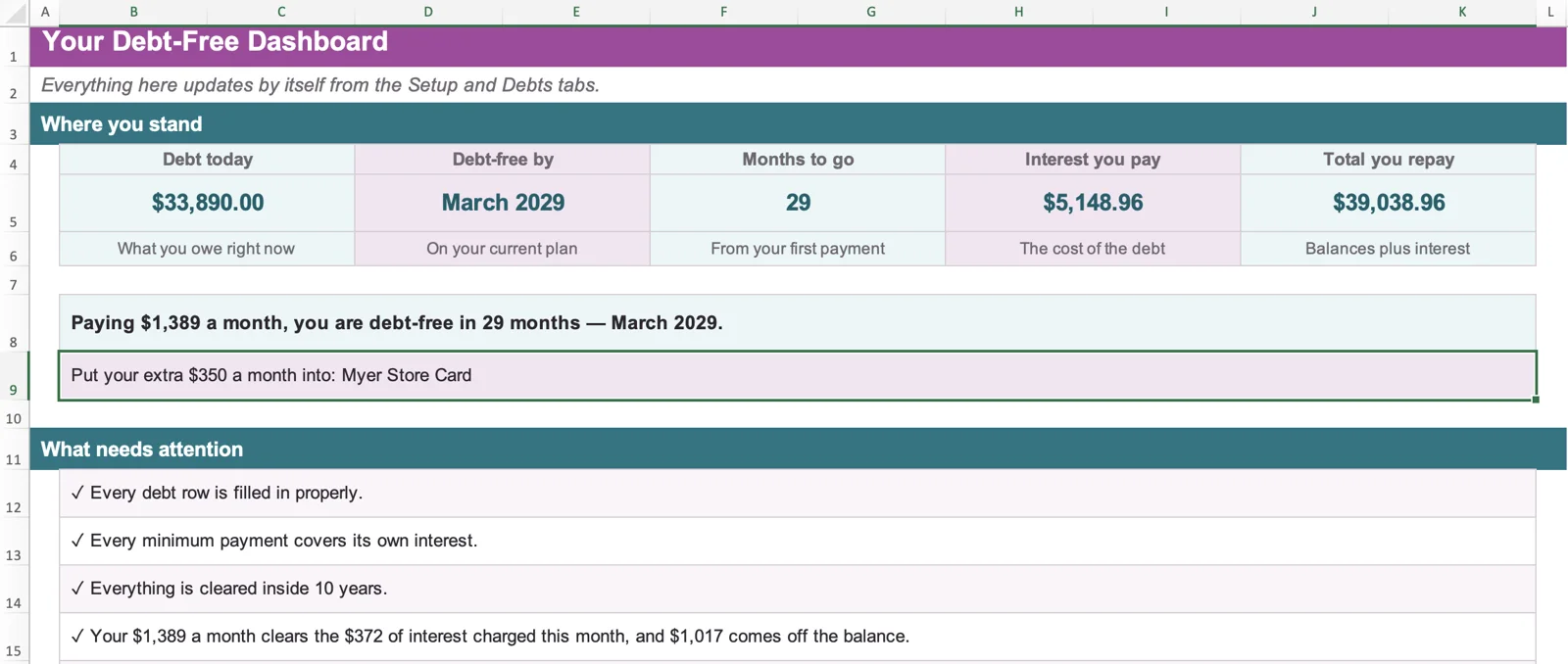
The Dashboard shows months to go, projected interest and which debt gets your extra payment.
Each month, interest is added to every balance, every minimum is paid, and whatever is left goes to your top-priority debt. When a debt is cleared, its payment moves on to the next one. The workbook does this for you, with nothing to calculate by hand.
This is why both methods speed up as you go. In the worked example below (avalanche, $350 extra a month), the amount going to the focus debt grows each time a debt disappears.
| Months | Focus debt | Paid to it each month | Where that comes from |
|---|---|---|---|
| 1 to 3 | Myer Store Card | $410.00 | $60 minimum + $350 extra |
| 4 | Myer Store Card, then CommBank Visa | $58.92, then $556.08 | Myer is cleared and the leftover moves on to CommBank, on top of its $205 minimum |
| 5 to 15 | CommBank Visa | $615.00 | $205 + $60 + $350 |
| 17 | ING Low Rate Mastercard | $684.00 | CommBank was cleared in month 16, so its $615 moves to ING |
| 19 to 23 | Latitude Personal Loan | $969.00 | $285 + $684 |
| 25 to 28 | Car Loan | $1,389.00 | Every minimum and the extra, all on the last debt |
Projections from the workbook, using the example debts below.
These screens use the example debts below. The download is blank until you add your own.
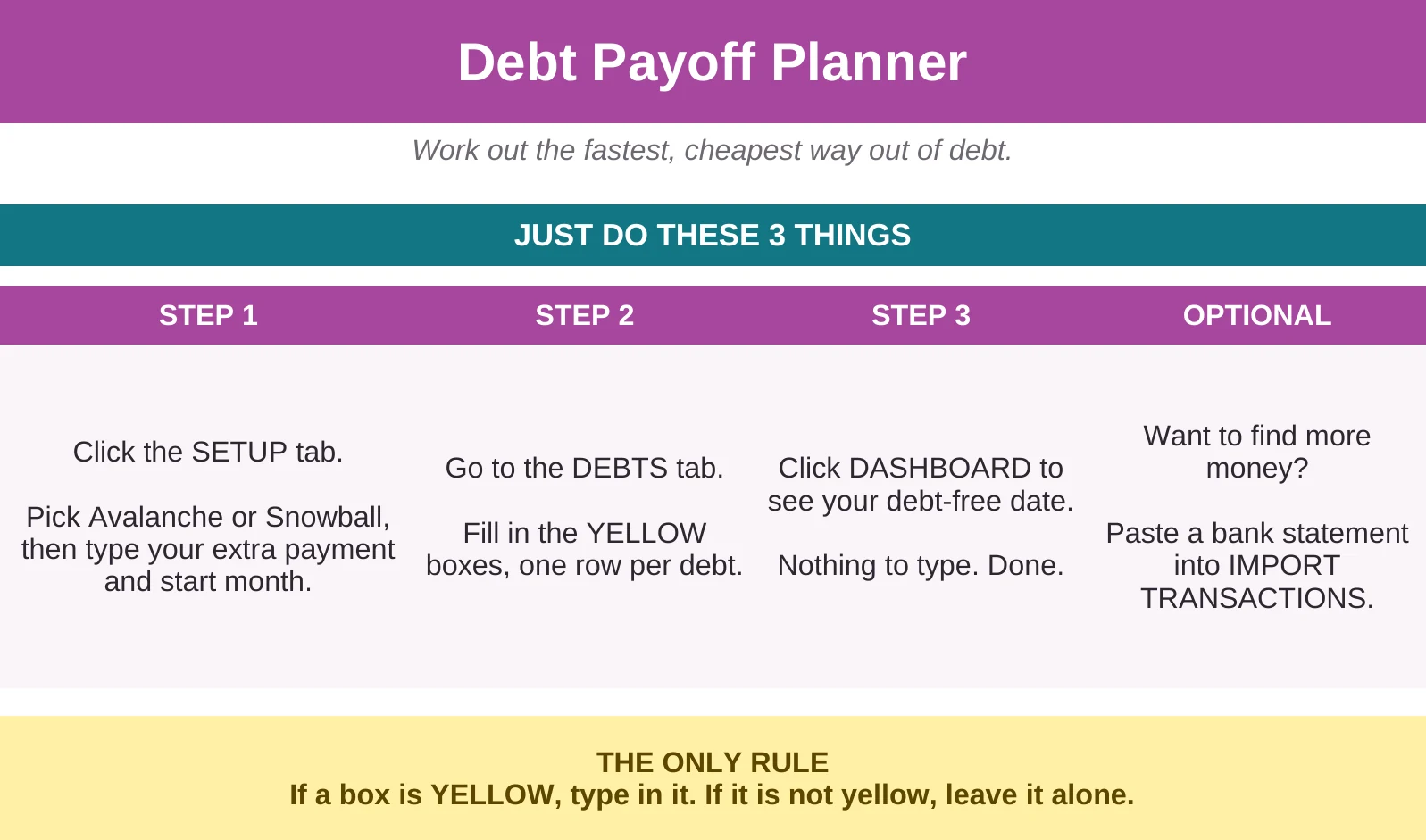
Set a method and extra payment, list your debts, then open the Dashboard. Yellow cells are yours; the rest calculates itself.
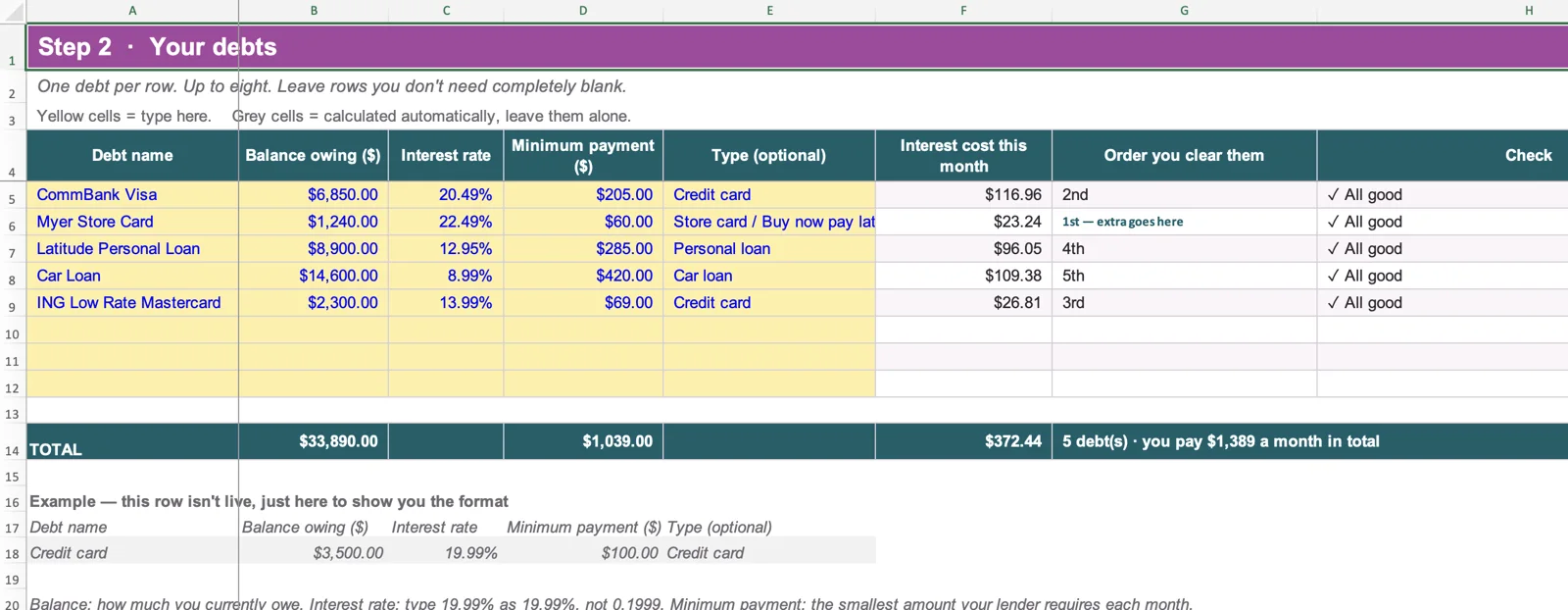
Balance, rate and minimum for each debt. A Check column flags missing details or a minimum that doesn't cover its interest.
Months to go, projected interest and which debt gets your extra payment, plus two charts.
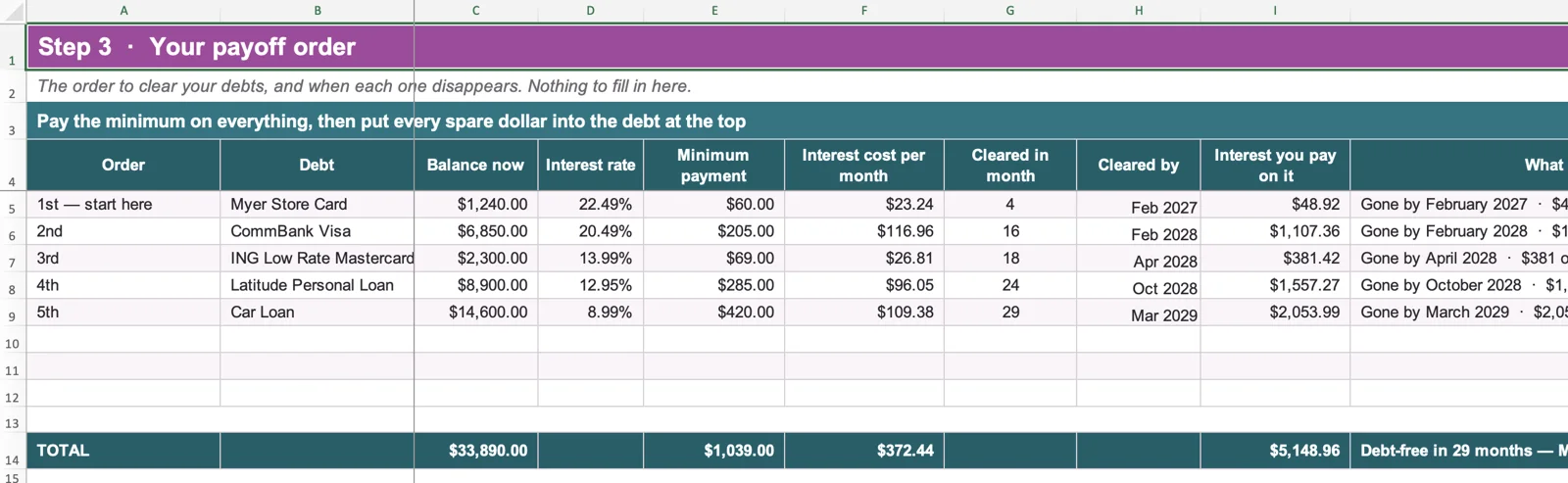
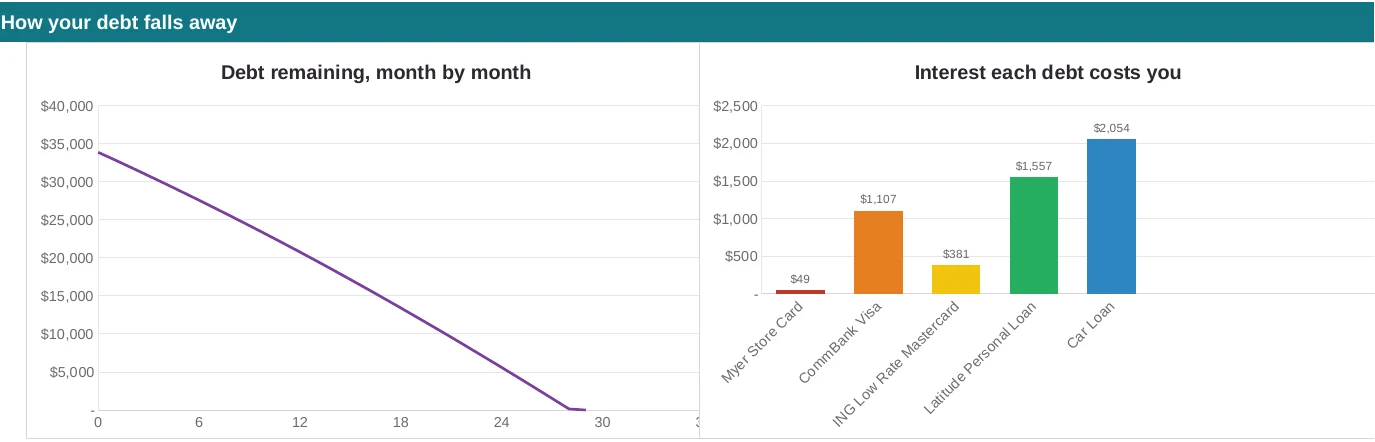
Which debt clears first, when each goes, and the projected interest on each.
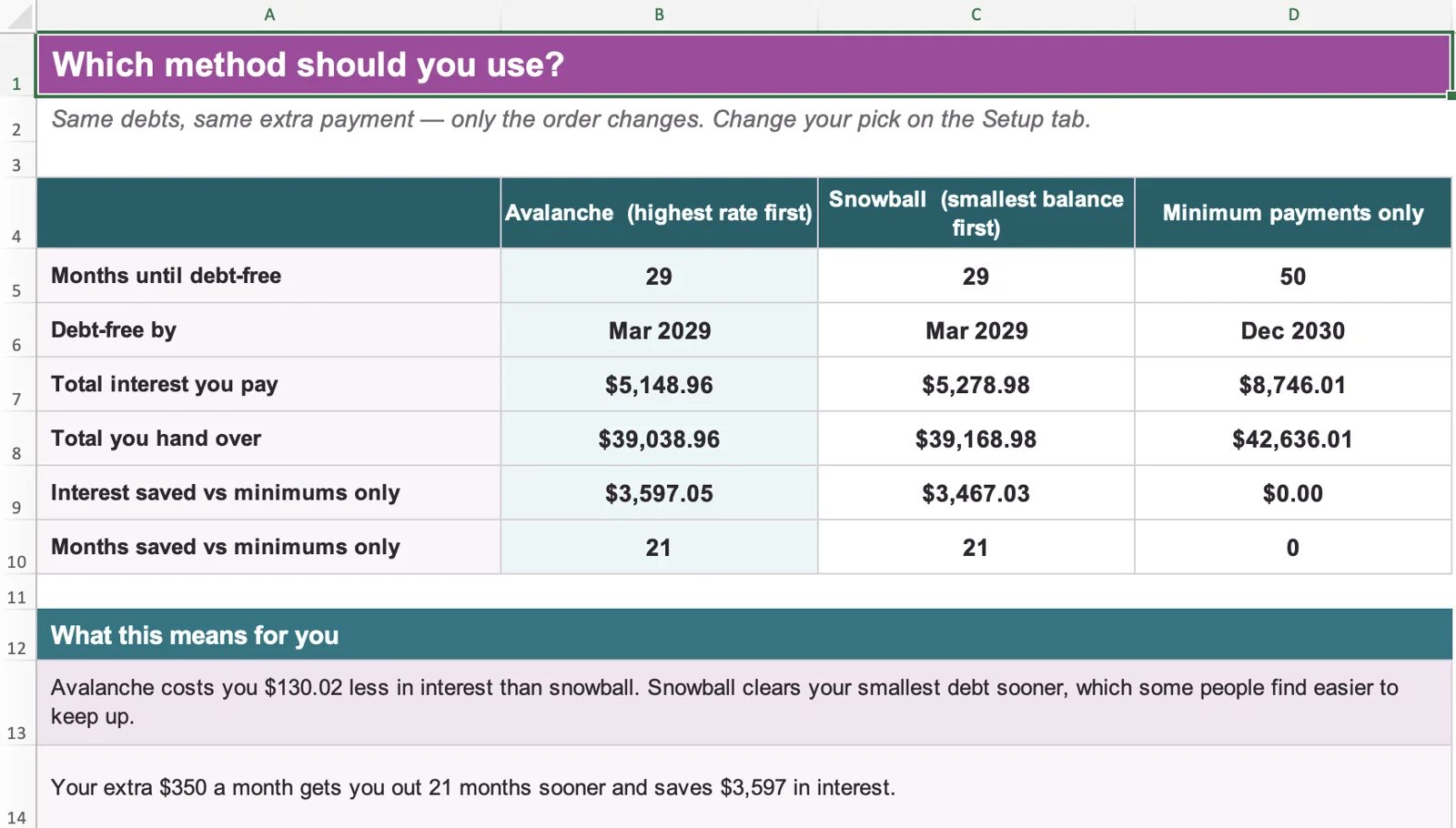
Same debts and extra payment, compared on months, interest and total repaid. Minimums only pays no extra and doesn't roll freed-up payments on.
Extra money goes to the highest interest rate first. It usually costs the least interest, because the most expensive debt is cleared first.
Extra money goes to the smallest balance first. Debts disappear sooner, which some people find motivating, and it can cost a little more interest.
Either way, every minimum is still paid on every debt. Only the destination of your spare money changes. The Compare tab shows both with your own numbers, and when rates and balances are similar the difference can be small.
These are illustrative workbook projections, not guaranteed outcomes. We entered five example debts and an extra payment of $350 a month into the planner. Debt names and rates are examples only, not any lender's actual rates.
| Debt | Balance | Interest rate | Minimum payment |
|---|---|---|---|
| CommBank Visa | $6,850 | 20.49% | $205 |
| Myer Store Card | $1,240 | 22.49% | $60 |
| Latitude Personal Loan | $8,900 | 12.95% | $285 |
| Car Loan | $14,600 | 8.99% | $420 |
| ING Low Rate Mastercard | $2,300 | 13.99% | $69 |
| Total | $33,890 | $1,039 |
| Method | Months | Debt-free by | Projected interest | Projected total repaid |
|---|---|---|---|---|
| Avalanche | 29 | March 2029 | $5,148.96 | $39,038.96 |
| Snowball | 29 | March 2029 | $5,278.98 | $39,168.98 |
| Minimum payments only | 50 | December 2030 | $8,746.01 | $42,636.01 |
In this example, avalanche costs $130.02 less interest than snowball, and both finish in month 29. Snowball clears the second debt (ING Low Rate Mastercard) in month 8 instead of month 18, which is the kind of trade-off the Compare tab lets you see for your own debts.
| Order | Debt | Cleared in month | Projected interest on it |
|---|---|---|---|
| 1st | Myer Store Card | 4 | $48.92 |
| 2nd | CommBank Visa | 16 | $1,107.36 |
| 3rd | ING Low Rate Mastercard | 18 | $381.42 |
| 4th | Latitude Personal Loan | 24 | $1,557.27 |
| 5th | Car Loan | 29 | $2,053.99 |
| Total projected interest | $5,148.96 | ||
Minimums only means each minimum and nothing extra, with freed-up payments not rolled on.
Change one input and the whole projection updates. Using the same example with avalanche, this is what the workbook shows when one thing changes:
| What changes | Months | Projected interest |
|---|---|---|
| As in the example ($350 extra a month) | 29 | $5,148.96 |
| Extra payment of $250 a month | 31 | $5,736.77 |
| Extra payment of $450 a month | 26 | $4,685.45 |
| No extra payment, minimums still roll on as debts are cleared | 41 | $8,476.97 |
| Myer Store Card balance $1,000 higher ($2,240) | 30 | $5,657.01 |
| CommBank Visa rate 2 points higher (22.49%) | 29 | $5,296.84 |
If a lender changes your rate, or you add to a balance, enter the new figure and the projection updates. The workbook assumes the numbers you enter stay the same.
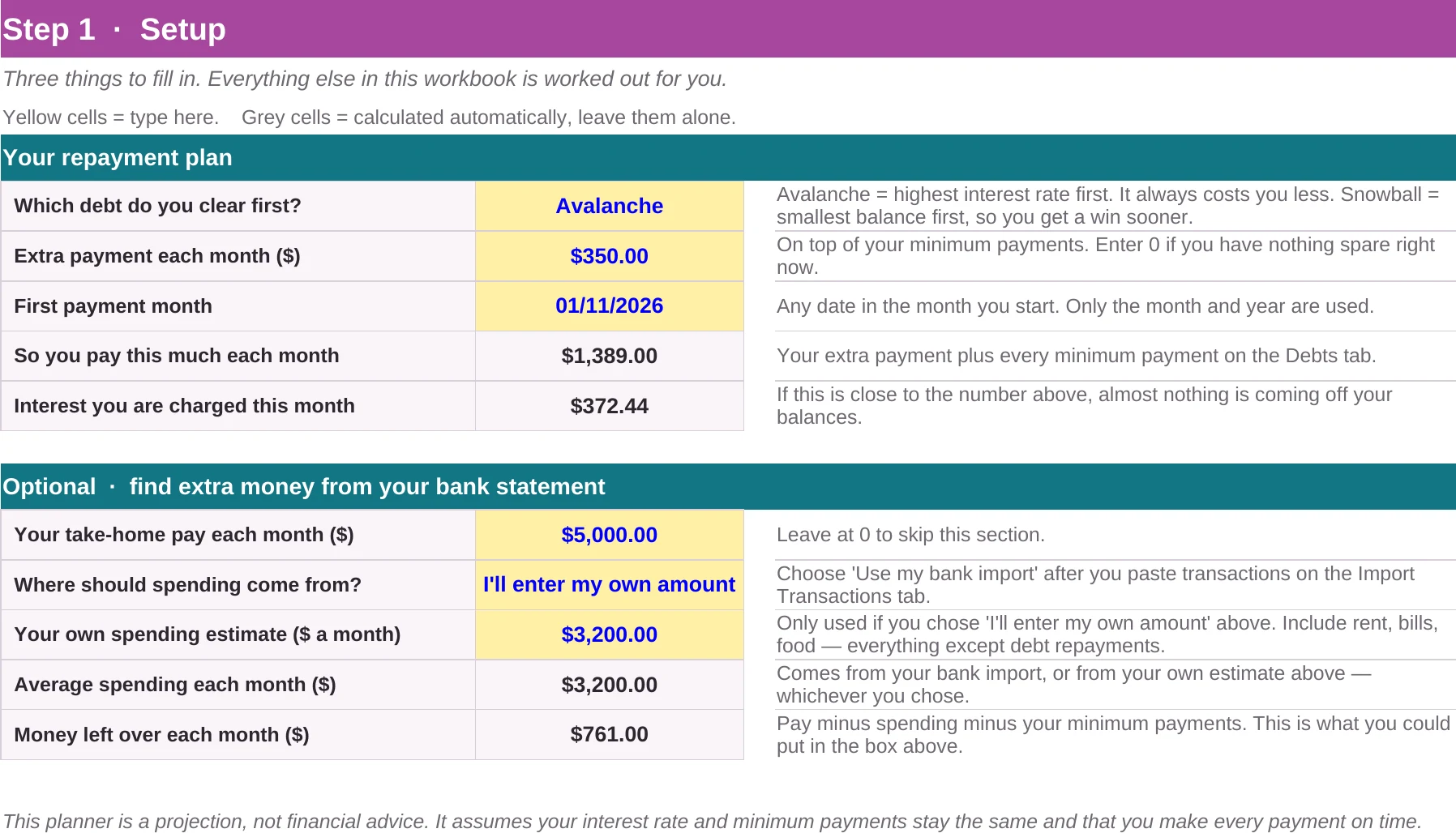
Enter your monthly take-home pay and a spending figure. The workbook subtracts spending and your minimum payments and shows the money left over each month, then suggests you could try that amount as your extra payment. Nothing changes by itself, so you type any extra payment in yourself.
There is no file upload or direct CSV or PDF import. For PDF statements, our free bank statement converter turns them into rows you can paste.
Not sure what your regular bills add up to each month? Our Household Bill Tracker spreadsheet shows them as a monthly total, which can help with your own monthly estimate.
Page last updated 6 November 2026.
A projection can't fix a payment that is already out of reach, and talking to someone sooner usually helps. Financial counselling in Australia is free. Moneysmart explains how it works, and the National Debt Helpline is on 1800 007 007, Monday to Friday, 9:30am to 4:30pm, with online chat on weekdays from 9am to 8pm.
Yes. It's a Microsoft Excel workbook (.xlsx) with no macros.
No. You type in your debts yourself, and nothing connects to your bank.
Not directly. Transactions are pasted in, as explained above.
It's an estimate, based on your rates and payments staying as entered, with no fees or new borrowing. Your lender's calculations may differ, so check against your statements.
No. It's a debt payoff planner. The optional money-left-over estimate shows what is left after your spending and minimum payments, but it doesn't track savings.
No. It's a payoff planning tool and doesn't recommend any financial product.
Snowball pays off the smallest balance first, so debts disappear sooner. Avalanche pays off the highest interest rate first, which usually costs less interest. The Compare tab shows both with your own numbers.
No. It's a planning tool, not personalised financial advice.
You get immediate access to the downloadable file and a short setup guide.
A month-by-month projection from your own debts.
Get the Debt Payoff Planner for $12.95 →