
Money Detective

Split shared bills fairly, and know exactly who owes who.

Split shared bills 50/50, in proportion to your incomes, or with your own percentages. This Excel spreadsheet gives you a settlement page that shows who owes who, and how much.
Microsoft Excel (.xlsx) · AUD format · No bank login required
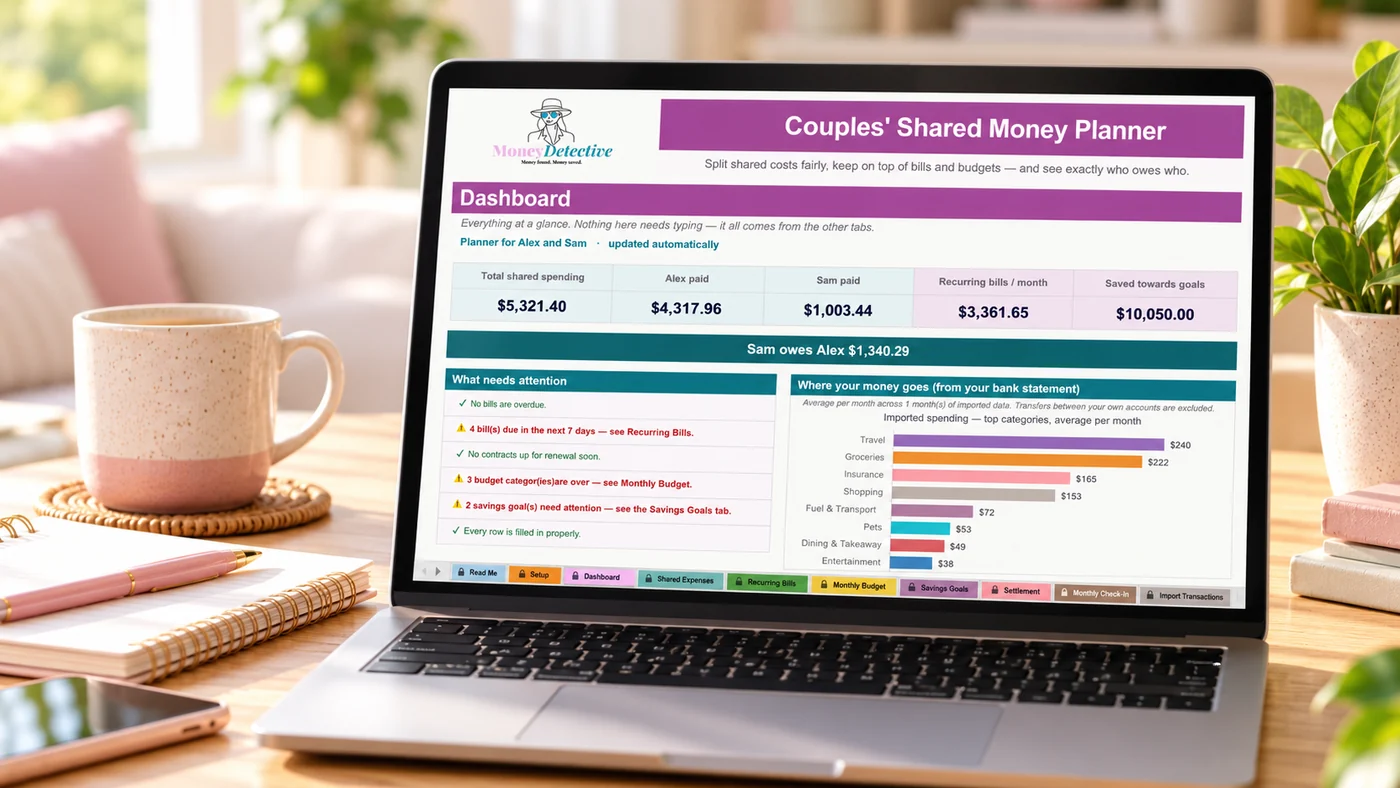
Couples' Shared Money Planner dashboard open on a laptop, showing total shared spending, who paid what and who owes who
Works in Microsoft Excel (.xlsx) Australian dollar format No bank connection required Instant digital access
The problem

Shared money gets complicated fast, especially with different incomes.

Different incomes make 50/50 feel unfair

Splitting everything evenly doesn't always make sense when incomes are different.

Tracking who paid what is tedious

Rent this month, groceries last month, keeping a mental tally gets messy fast.

Money conversations get awkward

Without clear numbers, working out who owes who can turn into a bigger discussion than it needs to be.

How it works

Three steps to a fair split

1

List shared expenses

Rent, groceries, bills, whatever you split together.

2

Pick how each one splits

50/50, proportional to income, or a custom percentage, your choice, per expense.

3

See the settlement, automatically

One page shows exactly who owes who, and how much, no manual maths.
Take a look inside

Take a look inside the planner

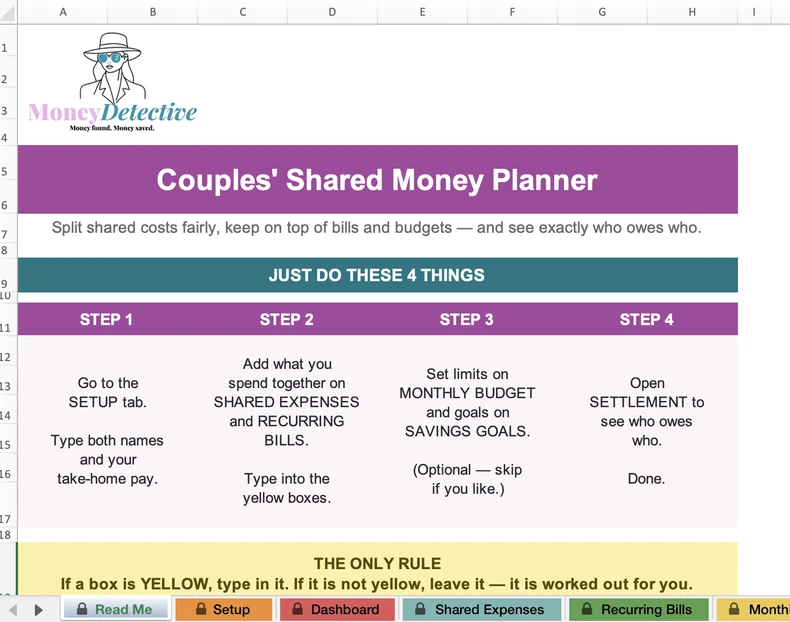
The Read Me tab of the Couples' Shared Money Planner, showing the four steps to get started
Start here

Four steps and you're done

A clear Read Me tab walks you through it. Add your names and pay, enter what you spend together, set optional limits and goals, then open Settlement to see who owes who.
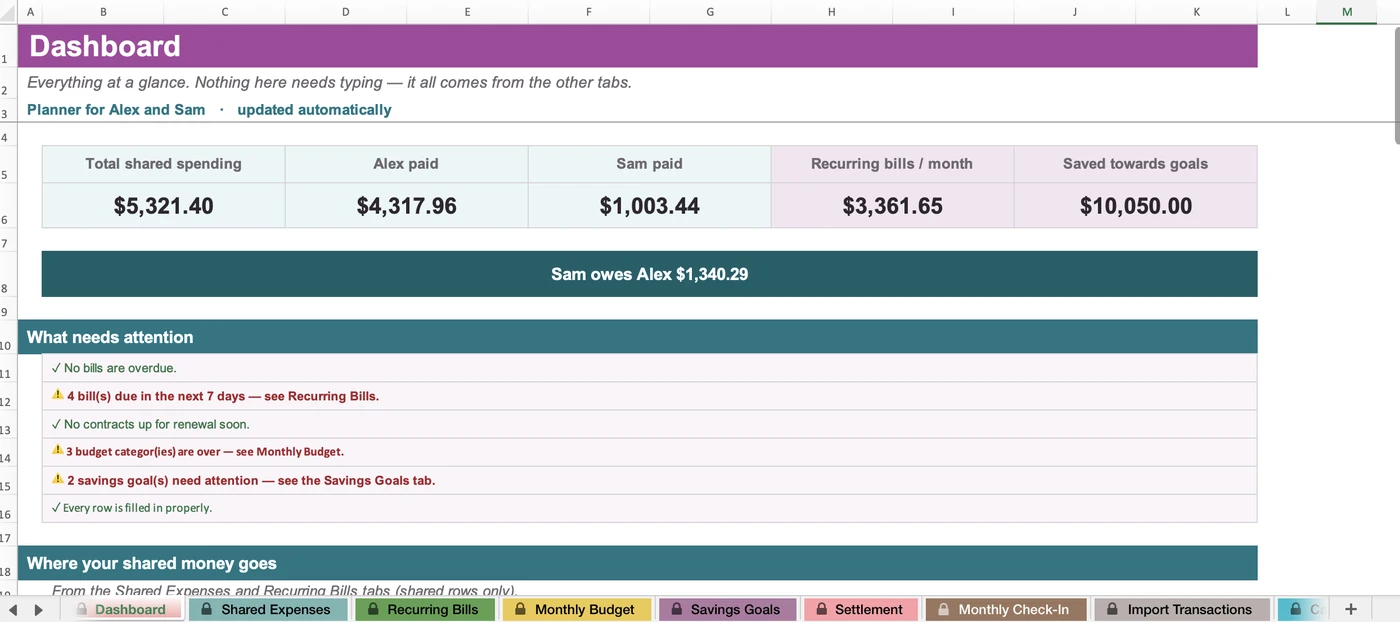
The Dashboard tab showing total shared spending, who paid what, recurring bills, savings and what needs attention
Dashboard

See where you stand at a glance

Total shared spending, who paid what, monthly recurring bills and savings progress, plus a clear note of who owes who. It all updates automatically from the other tabs.
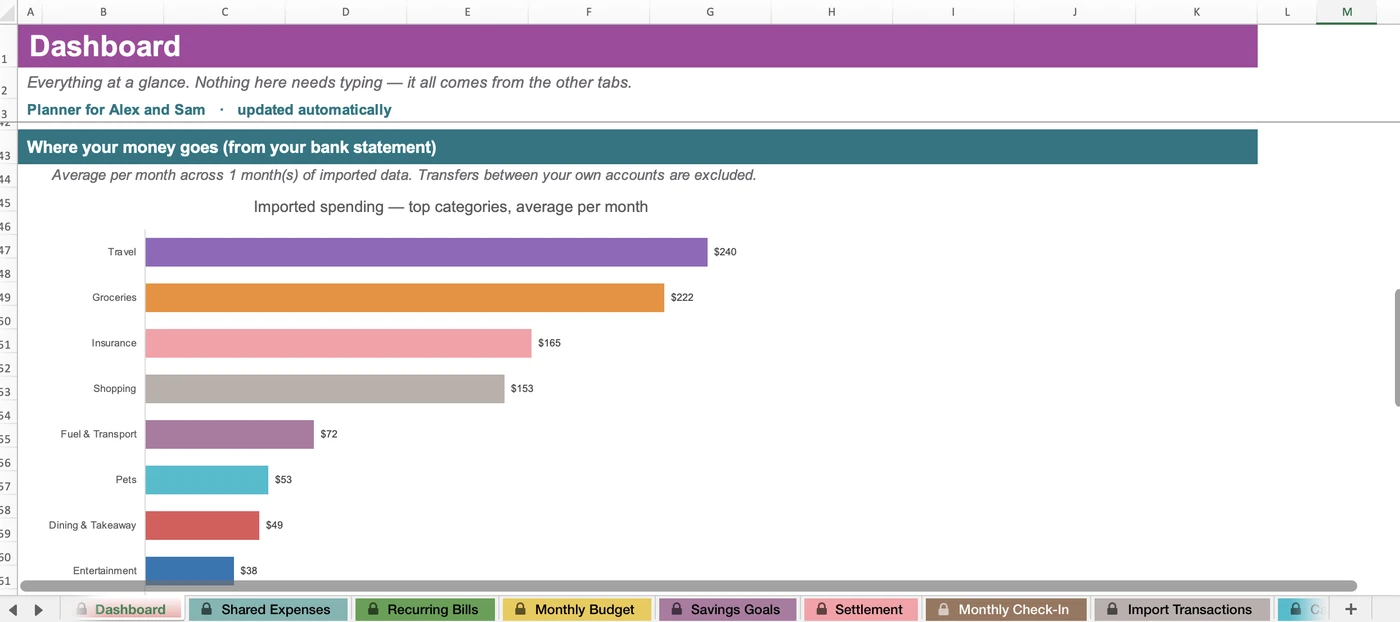
A Dashboard chart of top spending categories, averaged per month, from an imported bank statement
Optional bank import

See where your money goes

Paste in a bank statement and the Dashboard charts your top spending categories as a monthly average. Transfers between your own accounts are left out.
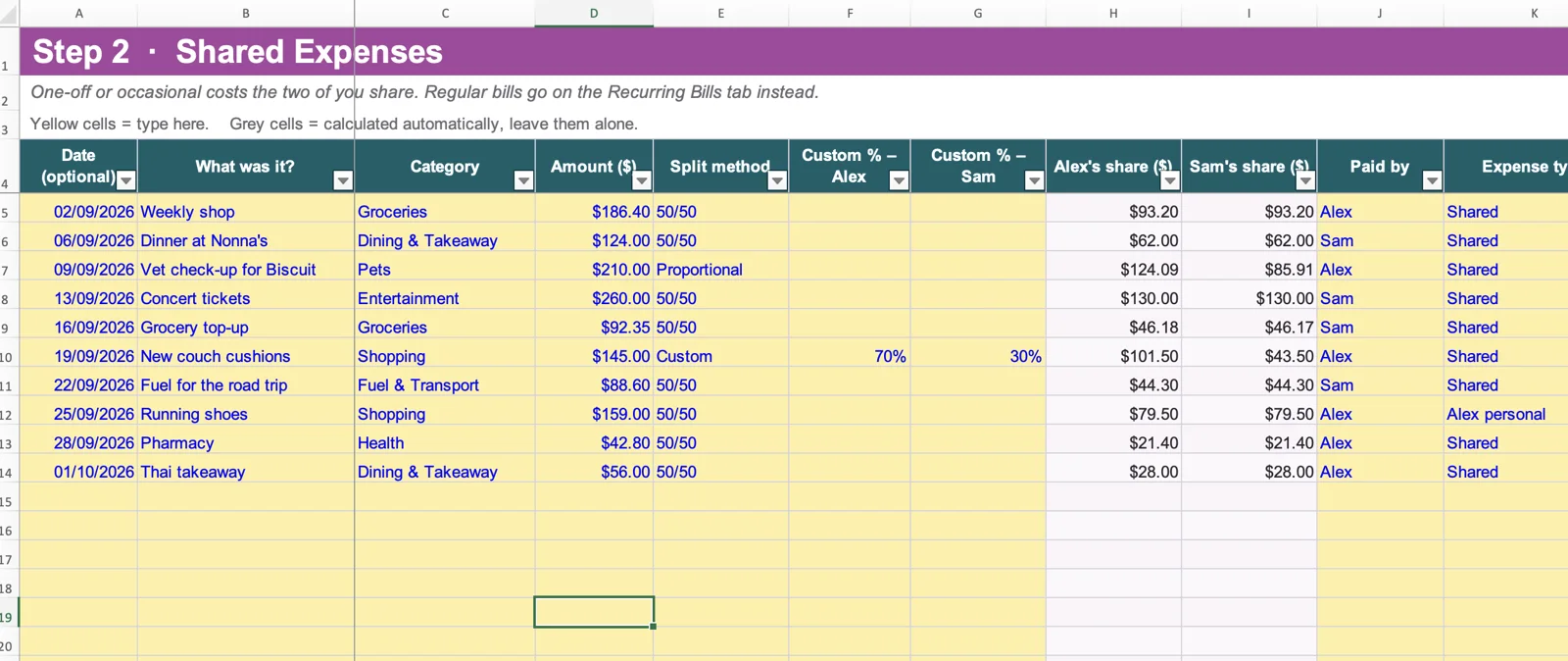
The Shared Expenses tab, where you log one-off costs and choose how each is split
Shared Expenses

Split each expense your way

50/50, proportional to income, or a custom percentage, set it per expense, and who paid it.
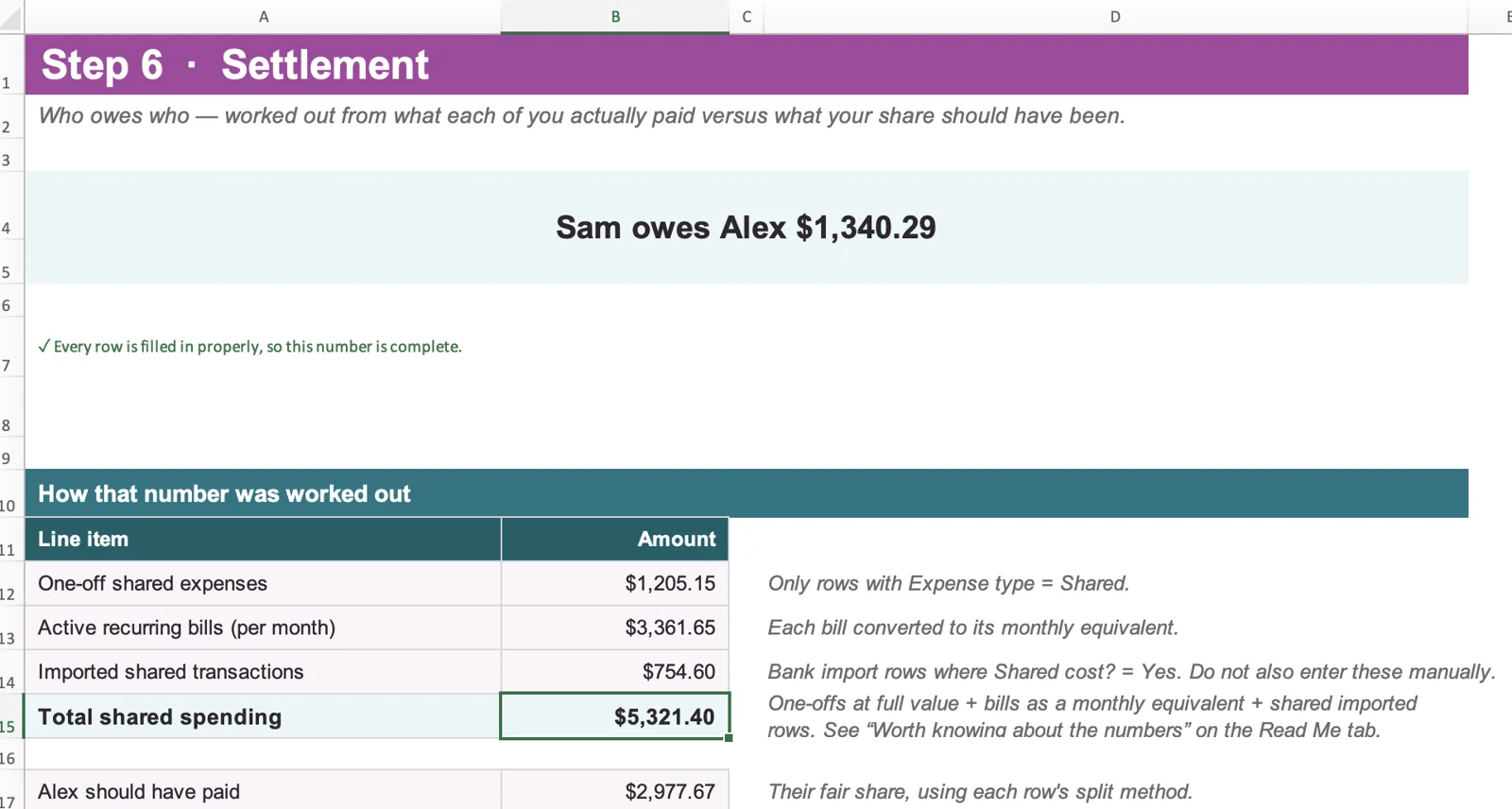
The Settlement tab showing who owes who and how the number was worked out
Settlement

Exactly who owes who

One clear number, worked out automatically from what each person actually paid versus their fair share.

A real example

Two different incomes, four shared expenses

$1,947
Total shared spend
$422
Settlement, calculated exactly
Real output from the planner's own sample data, not a rounded example.
Who it's for

Designed for people who...

This is for you if you:

  • Split bills with a partner and want it to feel fair
  • Have different incomes and want more than a flat 50/50
  • Want to stop manually tallying who paid for what
  • Use Microsoft Excel (.xlsx)
  • Don't want to connect your bank account

This isn't for you if you want:

  • A live bank-syncing app
  • Joint account management
  • Personalised financial advice

Built from real budgeting frustrations

This planner exists because splitting money with a partner shouldn't mean redoing the maths every time someone asks who owes who. It's built to make that one clear number, automatically.

Pricing

One simple price. No subscription.

Couples' Shared Money Planner

$12.95
introductory one-time price
  • A Microsoft Excel (.xlsx) workbook
  • 50/50, proportional-to-income, or custom % splitting
  • Automatic settlement page, exact amount, exact direction
  • Works with different incomes
  • Visual dashboard, shared spend by category
  • Bank statement import (CSV or PDF)

After payment, you'll receive immediate access to the downloadable file and setup instructions.
By completing this purchase, you agree to the Terms and Conditions and acknowledge the Privacy Policy.
FAQ

Questions before you buy

Is this an Excel file?

Yes. It is a Microsoft Excel (.xlsx) workbook.

Does it connect to our bank accounts?

No. You and your partner enter expenses yourselves, or paste transaction rows from your bank statement into the optional Import Transactions tab. Our free Bank Statement Converter can turn a statement PDF into rows that are ready to paste. Nothing connects to your bank.

Can we use different split methods for different expenses?

Yes, each expense can use 50/50, proportional to income, or a custom percentage, independently.

Does it work on a phone?

It is built for Microsoft Excel on a desktop or laptop, which is recommended for setup. Mobile spreadsheet apps vary in how well they handle Excel workbooks.

Is this financial advice?

No. This is an educational organisation tool, not personalised financial advice.

What happens after I purchase?

You get immediate access to the downloadable file and a short setup guide.

How is this different from an individual fortnightly budget?

The Couples' Shared Money Planner is for splitting shared expenses and working out who owes who. If you mainly want to plan your own household budget, compare it against what you actually spent and set savings goals for each pay, see Fortnightly Budget Plus.

Stop doing the maths on who owes who.

Split fairly, and let the settlement page do the working out.

Get the Couples Planner for $12.95 →