
Money Detective

Know exactly what you can spend before payday.

The simple Australian Excel and Google Sheets planner that helps you organise bills, save for upcoming expenses, and see your safe-to-spend amount every pay cycle.
Excel and Google Sheets · AUD format · No bank login required
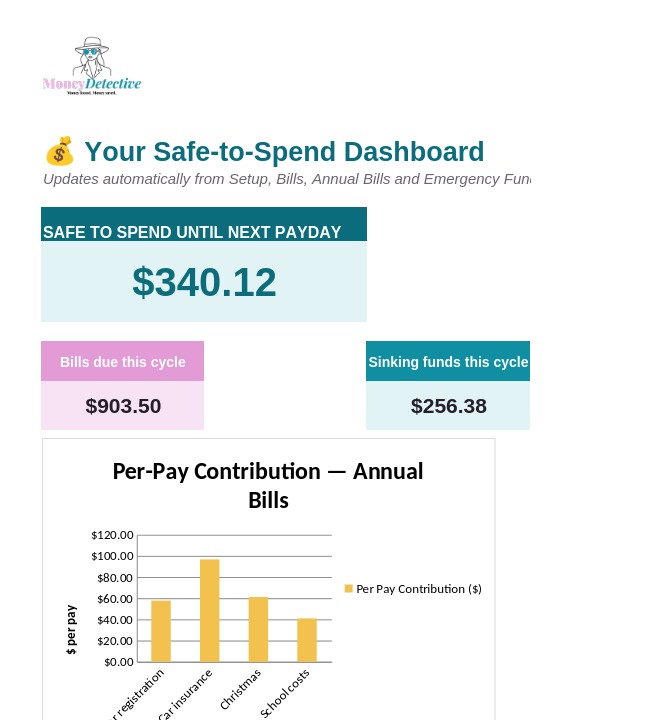
Payday Buffer Planner dashboard showing Safe to Spend amount
Works with Excel and Google Sheets Australian dollar format No bank connection required Instant digital access
The problem

Budgeting becomes difficult when your money doesn't line up with your bills.

Bills arrive at different times

Annual expenses like insurance, registration, and Christmas are easy to forget until they land all at once.

You get paid, but don't know what's actually safe to spend

A monthly budget doesn't always work when you're paid weekly or fortnightly.

Savings goals keep getting pushed aside

Without a clear amount and deadline, saving becomes the first thing that slips.

How it works

A clearer way to manage money between paydays.

1

Add your income and pay dates

Enter your weekly, fortnightly, or monthly income once.

2

Add your bills and savings goals

The planner works out how much to set aside for each one automatically.

3

See what's safe to spend

The dashboard shows upcoming bills, savings progress, and your remaining amount.
Take a look inside

See exactly what you're getting.

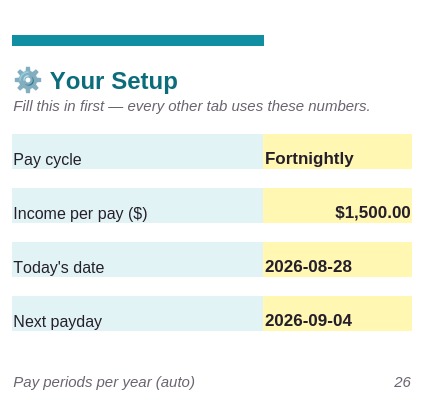
Setup tab — pay cycle, income, next payday
Setup

Set your pay cycle once

Weekly, fortnightly, or monthly — enter your income and next payday, and every other tab works from these numbers automatically.
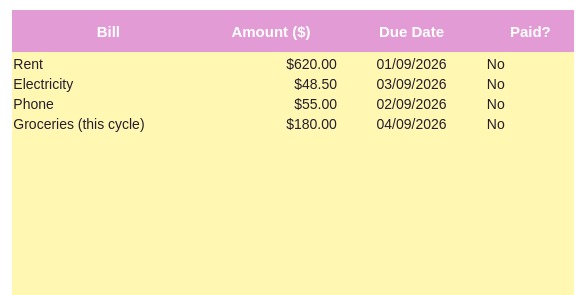
Bills This Cycle tab
Bills Calendar

See what's due before your next payday

List what's coming out before you get paid again — the planner totals it instantly so nothing catches you out.
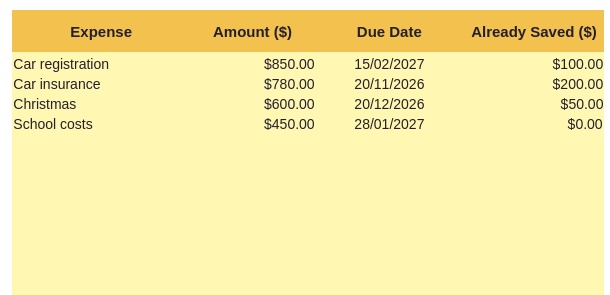
Annual Bills and Sinking Funds tab
Sinking Funds

Prepare for annual expenses before they land

Car rego, insurance, Christmas, school costs — the planner calculates exactly how much to set aside each pay so the full amount is ready when it's due.

Dashboard showing Safe to Spend amount and charts
Dashboard

Your safe-to-spend amount, at a glance

Bills, sinking funds, and emergency fund progress — all rolled into one clear number, updated automatically as you go.

A real example

A$1,500 fortnightly income

$900
Bills & essentials
$150
Savings & sinking funds
$450
Safe to spend
You can adjust the figures to match your own situation.
Who it's for

Designed for people who...

This is for you if you:

  • Are paid weekly or fortnightly
  • Forget annual and irregular bills
  • Want to build an emergency fund
  • Prefer Excel or Google Sheets
  • Don't want to connect your bank account
  • Have tried budgeting apps but stopped using them
  • Want a simple system, not a complicated dashboard

This isn't for you if you want:

  • A live bank-syncing app
  • Personalised financial advice
  • Investment or loan recommendations
  • Automatic transaction categorisation with zero setup

Built from real budgeting frustrations

This planner was designed for people who want a practical way to manage paydays, bills, and savings — without connecting their bank account or learning a complicated budgeting system. It's the tool I wished existed when I was trying to work out what I could actually afford to spend before my next pay.

Pricing

One simple price. No subscription.

Payday Buffer & Annual Bills Planner

$19.95
one-time payment
  • Excel version
  • Google Sheets compatible
  • Weekly, fortnightly and monthly pay cycles
  • Bills calendar
  • Sinking-funds calculator
  • Emergency fund tracker
  • Safe-to-spend dashboard with charts
  • Bank statement import (CSV or PDF)
  • Sample data included, ready to edit

After payment, you'll receive immediate access to the downloadable file and setup instructions.
By completing this purchase, you agree to the Terms and Conditions and acknowledge the Privacy Policy.
FAQ

Questions before you buy

Is this an Excel file?

Yes. It works fully in Microsoft Excel, and just as well in Google Sheets — upload it to Google Drive and open with Google Sheets.

Does it connect to my bank?

No. You never provide bank login details. You can optionally paste in a CSV export, or use the free PDF converter tool — either way, your data stays entirely under your control.

Can I use it if I'm paid fortnightly?

Yes — fortnightly budgeting is one of the main reasons this planner exists. Weekly and monthly are supported too.

Does it work on a phone?

The Google Sheets version can be viewed and edited on mobile. A desktop or laptop is recommended for the initial setup.

Is this financial advice?

No. This is an educational budgeting and organisation tool. It doesn't recommend investments, loans, superannuation products, or any other financial product.

What happens after I purchase?

You get immediate access to the downloadable file and a short setup guide.

Start managing your money with more clarity.

Plan your bills, protect your savings, and know what you can safely spend before payday.

Get the Payday Buffer Planner →