
Split shared bills fairly — 50/50, proportional to income, or custom — and get an automatic settlement page that says exactly who owes who, and how much.
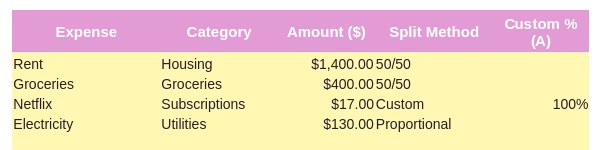
Splitting everything evenly doesn't always make sense when incomes are different.
Rent this month, groceries last month — keeping a mental tally gets messy fast.
Without clear numbers, working out who owes who can turn into a bigger discussion than it needs to be.
Rent, groceries, bills — whatever you split together.
50/50, proportional to income, or a custom percentage — your choice, per expense.
One page shows exactly who owes who, and how much — no manual maths.
50/50, proportional to income, or a custom percentage — set it per expense, and who paid it.
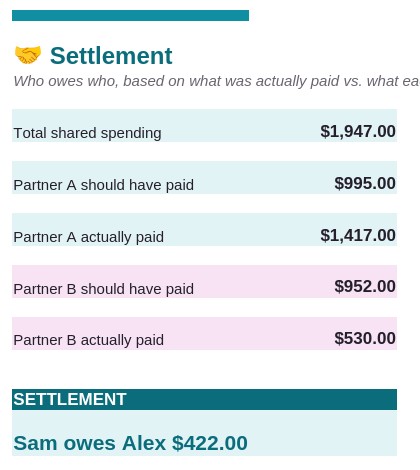
One clear number, worked out automatically from what each person actually paid versus their fair share.
This planner exists because splitting money with a partner shouldn't mean redoing the maths every time someone asks who owes who. It's built to make that one clear number, automatically.
Yes. It works fully in Microsoft Excel, and just as well in Google Sheets.
No. You and your partner enter expenses yourselves, or paste in a CSV/PDF statement.
Yes — each expense can use 50/50, proportional to income, or a custom percentage, independently.
The Google Sheets version can be viewed and edited on mobile by both partners.
No. This is an educational organisation tool, not personalised financial advice.
You get immediate access to the downloadable file and a short setup guide.
Split fairly, and let the settlement page do the working out.
Get the Planner →